Citibank Debit Card Online Activation & Account Access
Citi allows its customers with a new Citibank Debit Card to activate it through the internet and set up online account access at the convenience of their home or anywhere they want anytime from a web-enabled cell or smartphone or computer.
The new consumers who do not have a Citibank Debit Card can also apply for one by submitting an online application of Citi Checking Account and enjoy the convenient access to their money for everyday purchases.
Citibank Debit Card Features & Benefits
Citibank Debit Card that comes with a Citibank Checking Account offers the users a lot of great features and advantages such as
- Use Citibank Debit Card instead of cash and checks to make purchases
- Safer than carrying cash and accepted at millions of merchants worldwide
- Withdraw cash while making debit purchases by using the PIN at participating merchants
- Get cash, make transfers and access information between eligible Citibank accounts with no surcharge-fee ATMs over 60,000 locations in the US
- Citi Private Pass ticket offers for live music, sports, dining, family entertainment, and others.
- $0 liability from the unauthorized transaction made with the debit card
- Debit Card with chip technology protects customer account information from unauthorized access by fraudsters when used at chip-enabled terminals and ATMs
- Access your Citibank Debit Card Account and transactions using Citi Mobile
- Review card purchases and check monthly statement online conveniently and more
How to Activate Citibank Debit Card Online
Activating a Citibank Debit Card online is simple and easy. To get started, keep the card along with the mail package that you have recently received by post handy and open a web browser on your own computer and use the following steps. For account security, you are recommended to avoid using a public or shared device.
- Go to Citibank Activate Your Card Page, Activate Citibank Debit Card
- Enter the number on your Citi Debit Card without spaces or dashes
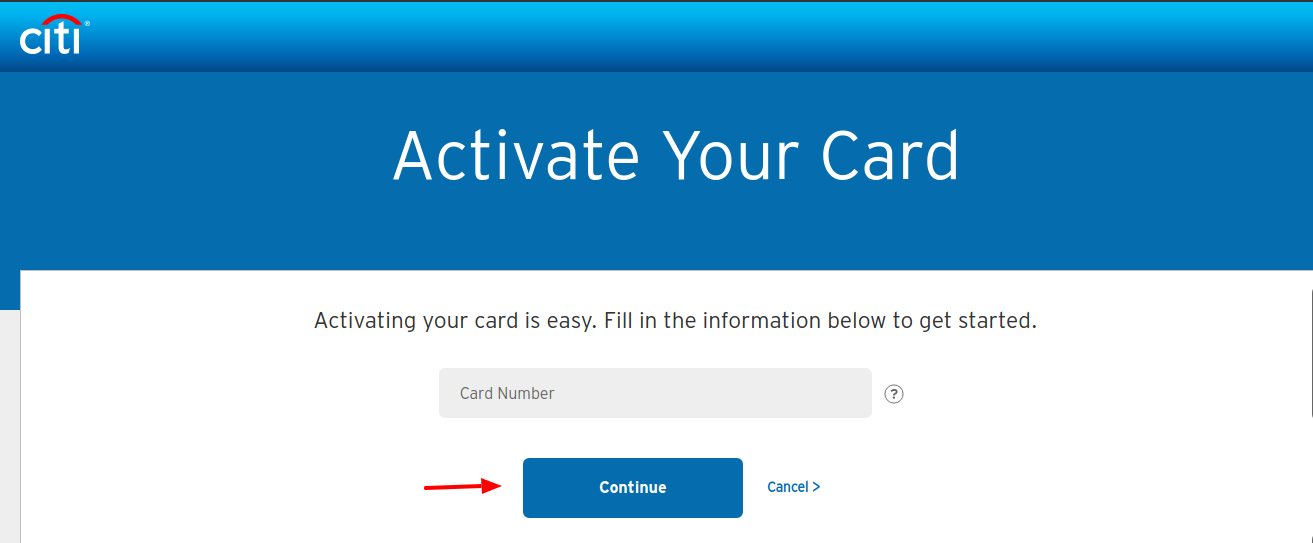
- Click the “Continue” button to proceed.
- Enter the requested details like name appearing on the card, security code, security word, etc. in their respective fields
- Follow the prompts and click on the “Activate” button to activate your Citibank Debit or ATM Card.
How to Get a Citibank Debit Card Online
Citibank Debit/ATM Card is available with its checking account. Hence, to get a Citibank Debit Card you must have a Citibank Checking Account. If you do not have one, you can apply for it online. To open a Citi checking account, you must be a US citizen or resident at least 18 years of age and have a Social Security Number. Here is a short guide provided for you to initiate the online application.
- Visit Citi Open a Bank Account webpage, online.citi.com/US/ag/open-a-bank-account
- Select type of an account as “Checking & Savings” from the drop-down list at the middle of the ‘Apply for an Account’ box
- Click on the “Get Started” button.

- Choose a Checking Account Package that meets your banking needs and click on the “Apply Now” button at the end of the row.
- Select if there is a joint applicant and enter your first name and Joint Applicant’s first name (if applicable)
- Again, click on the “Get Started” button to submit some basic information about yourself including your middle initials, last name, date of birth, email address, phone number, address, city, state, and zip code.
- Input your mother’s maiden name. (You may be asked to provide when Citi call you for verification).
- Click on the “Continue” button to move to the next steps.
You may also ask to show your driver’s license or other identifying documents. Provide all the details as required and complete the rest of the application and submit for the application to be processed. If you meet all the eligibility criteria set forth by Citi, you will get the approval to open a checking account with Citi and receive your Citi Debit Card.
Citibank Checking Account Benefits & Features
Besides Debit or ATM card facilities, you can enjoy the following benefits with your Citibank Checking Account.
- No minimum opening deposit
- Easily transfer money between Citi and Non-Citi Accounts
- Pay bills online
- Deposit checks from your mobile device
- Set up payments, deposits and balance alerts for more control over your finance
- Add your Citi Debit Card to mobile wallet
- Send money with Zelle- a fast and easy way to send and receive money
- Get access to pre-sale tickets and exclusive experience for concert, sports, dining and more with Citi Entertainment
- Enroll in Citi ThankYou Rewards with an eligible checking account package to earn ThankYou points and get more benefits.
How to Register for Citi Online Access
In order to manage your Citi Debit Card account online in a better way as well as get more control over the funds on your Citi Checking Account, you can register for Citi Online Access services. For that, have the debit card or checking account info ready and
- Visit online.citi.com/US/ag/open-a-bank-account
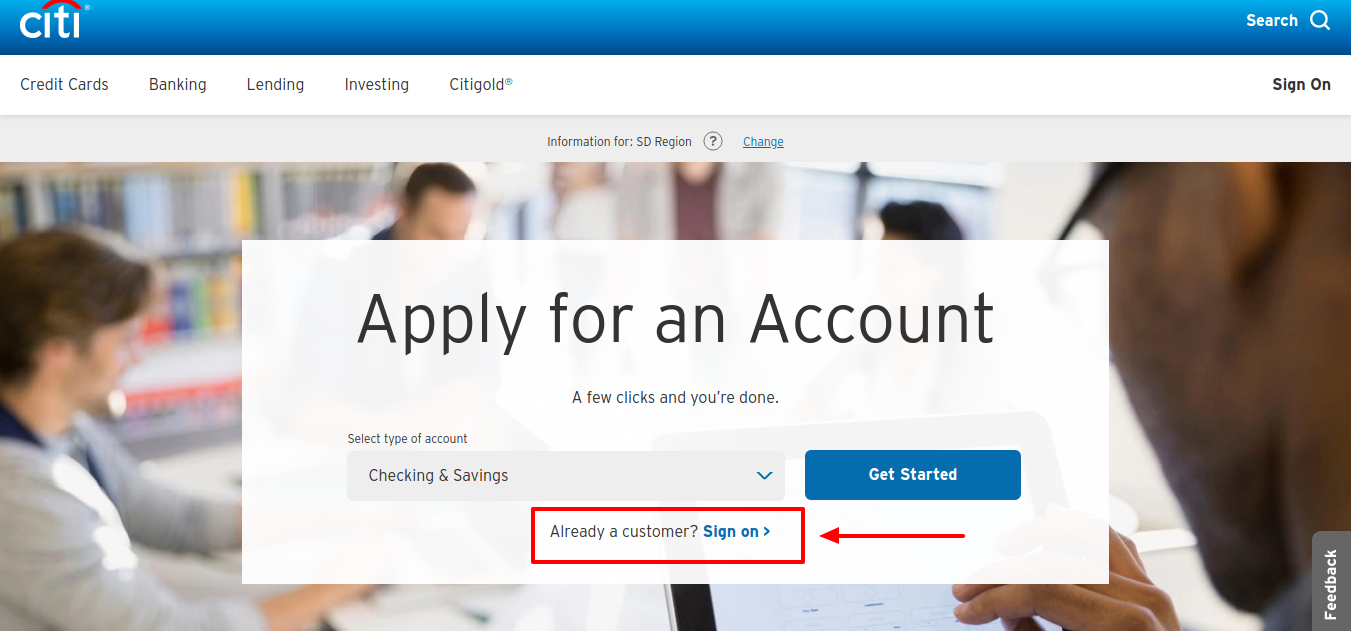
- Click on the “Sign on” link at the bottom of the ‘Apply for an Account’ area on the upper middle of the page.
- Click on the “Register for online access” link at the bottom of the ‘Sign On’ box popped-up your computer screen
- Enter either your Citi Debit Card Number or your Citi Checking Bank Account Number without spaces or dashes in its respective field.
- Click on the “Continue Set Up” button to create the Username and Password of your Citi Online Access Account.
Also Read : How to Get A JH Preferred Card Online
How to Log In Citi Online Account
Once you are registered for Citi Online Access, you can log into your Citi Debit Card and Checking account online and take advantage of all the benefits of the service. To log in,
- Visit online.citi.com/US/ag/open-a-bank-account
- Click on the “Sign on” link next to ‘Already a customer’ underneath the ‘Apply for an Account’ box.
- Enter the User ID and Password you created during registration
- Select the “Remember my User ID” checkbox to quicken the login process for the next time.
- Click on the “Sign On” button
How to Recover Citi Online Account Login Info
If you have trouble to log in your Citi Online Access, you can retrieve the user Id and reset the password. To start the recovery procedure of your login credentials, click on the “Forgot User ID?” or “Forgot Password?” link below the Sign-On section and submit your Citi Debit Card or Checking Account Number.
Also Read : Reload Hop Card and Check Balance
Contact Information
Citi Card Customer Service Number: 1-800-325-2865
For general support and retail services, call the number back of your Debit Card. If you do not have the card on your hand, then call the given above.
Citi Online Banking Support Phone Number: 1-800-374-9700
To apply by phone and check the application status, call at 1-800-745-1534
Mailing Address for General Correspondence
Citibank Customer Service
P.O. Box 6500
Sioux Falls, SD 57117
Reference :
online.citi.com/US/ag/open-a-bank-account
Official Security Verification Protocol for How To Activate Citibank Debit Card Online
Under Google Search Essentials and global financial regulatory standards, protecting cardholder credentials from spoofing, credential harvesting, and identity theft is paramount. Review this verified authentication checklist prior to accessing your account.
The 4 Golden Rules: What Authentic Financial Institutions Will NEVER Ask
No legitimate customer service agent or automated phone prompt will ever contact you asking for your two-factor SMS OTP or push notification token.
Card issuers will never ask for your full 16-digit account number, 3-digit CVV security code, or ATM PIN on a call they initiated.
Never install AnyDesk, TeamViewer, or UltraViewer at the request of anyone claiming to assist with portal login errors.
Fraudsters frequently claim accounts are "locked" and demand prepaid gift cards or crypto transfers to clear holds. Issuers never operate this way.
Lost, Stolen, or Compromised Account: 4-Step Emergency Action Plan
Immediate In-App Card Lock
Open your verified mobile banking application, navigate to Card Controls or Security, and instantly toggle "Freeze Card" or "Lock Card" to prevent unauthorized physical and digital transactions.
Call the Verified Number on Your Physical Card
Do NOT trust phone numbers from unsolicited SMS messages or search ads. Always dial the exact customer support or fraud hotline printed on the physical back of your card.
Invoke Fair Credit Billing Act (FCBA) Protections
Under U.S. federal law (FCBA) and equivalent global directives, consumer liability for unauthorized credit card charges is legally limited to $0 (zero liability policies) or a maximum of $50 if reported within 60 days of statement issuance.
Place Free Fraud Alerts with Credit Bureaus
If login credentials or sensitive data were exposed, place an immediate free 1-year fraud alert or credit freeze with all three major bureaus: Experian, Equifax, and TransUnion.